Trucking Invoice Examples & What to Include
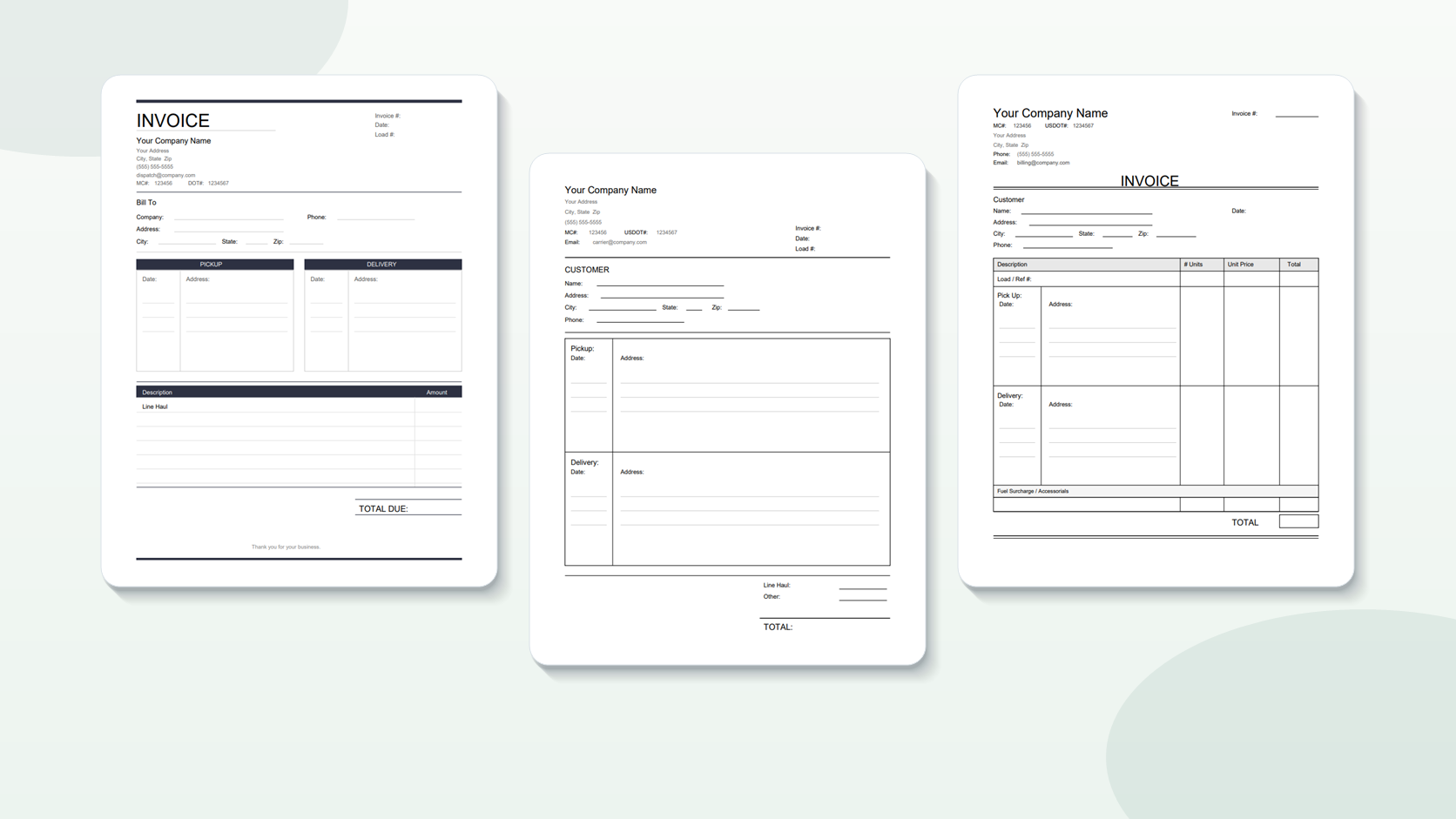
A transportation invoice is only useful if the broker can approve it without questions — and the same five missing or mismatched fields are the cause of most rejections. New carriers guess at the format, forget necessary fields, or send invoices that look nothing like what the broker’s AP department expects. A comprehensive trucking invoice will have carrier information with MC and DOT numbers, bill-to information that matches the rate confirmation, load information, itemized costs, and a signed Bill of Lading (BOL) attached. Here are some sample invoices for typical load kinds, with notes explaining what needs to be done appropriately and where carriers often make mistakes.
What is a Standard Trucking Invoice?
The typical trucker invoice is a single page with a carrier header, bill-to block, load data, line-item charges, and a total, followed by the signed BOL in the same PDF.
My first invoices resembled business letters. No structure, no bottom line total, no reference numbers. The brokers had to search out the information they needed, thus my bills ended up in the “deal with later” pile instead of the queue for payment.
What a clean conventional transportation invoice layout looks like:
Top section — Carrier header:
ABC TRUCKING LLC
123 Main St, Dallas, TX 75201
(555) 123-4567 | [email protected]
MC-123456 | USDOT 1234567
Bill-to block:
Bill To:
XYZ Logistics Inc.
AP Department
456 Commerce Ave, Chicago, IL 60601
[email protected]
Load details:
Invoice Number: INV-2026-0158
Invoice Date: May 1, 2026
Load Number: LD-78432
Pickup and delivery:
Pickup: May 1, 2026 — ABC Shipper, 789 Industrial Blvd, Houston, TX
Delivery: May 2, 2026 — XYZ Warehouse, 321 Dock St, Memphis, TN
Charges:
Line Haul:          $2,100.00
Fuel Surcharge:       $185.00
────────────────────────────
Total Due:          $2,285.00
Payment Terms: Net 30
This layout pulls every field right from the rate confirmation. Load number is matched character by character. The charges are at the negotiated rate. Not the dispatchers contact details, the bill to address is the billing email from the rate con. That’s the difference between an invoice that clears AP in a day, and one that waits in a queue for a week.
What should go on a trucking company invoice?
Five groups of fields: (1) your carrier info with MC and DOT numbers. (2) broker bill-to with billing email. (3) load and invoice numbers. (4) pickup and delivery details. (5) itemized rate and total.
The field that creates most trouble is the load number. If it doesn’t match the rate statement exactly, even by one character, some broker systems will auto-reject it. My invoice said “LD 78432” and the rate con said “LD-78432”. I got one turned down for a dash. That one character took me 2 weeks.
Complete field reference:
| Field Group | Required Fields | Where to Find It | #1 Mistake |
|---|---|---|---|
| Carrier Info | Company name, address, phone, email, MC#, DOT# | Your authority documents | Missing MC or DOT number |
| Bill-To | Broker name, billing address, billing email | Rate confirmation | Using dispatcher’s email instead of AP email |
| Load Details | Load/reference number, your invoice number, invoice date | Rate confirmation + your records | Load number doesn’t match rate con exactly |
| Pickup/Delivery | Dates, addresses, shipper/consignee names | Rate con and BOL | Dates don’t match BOL |
| Charges | Line haul, fuel surcharge, accessorials (itemized), total | Rate con + accessorial documentation | Not itemizing — listing one lump sum |
MC and DOT numbers are not negotiable. These are used by brokers to verify your operational authority before releasing payment. If they’re not on your invoice header expect a hold. Add them once to your template and worry no more.
How Does the Type of Load Change a Truck Load Invoice?
The fundamental fields are the same for all load categories, although flatbed loads may require equipment specifications, reefer loads require temperature certification and LTL invoices require weight and piece counts per shipment.
I generally haul dry van but the one time I did haul a reefer load I forgot to put the temperature confirmation on the invoice. 3 weeks payment held while they “verified delivery condition” Now I know: if there is a temperature requirement on the rate agreement the temp log goes with the invoice.
Dry Van Standard: This is the simplest bill. Total + line haul + fuel surcharge. Sign BOL and append. That’s it. The previous example is a wonderful example of this.
Multi-stop loads: Multi-stop invoices require a breakdown of pickup/delivery for each location. Please list them in order, including address and date for each:
Stop 1 - Pickup: May 1, 2026 — ABC Shipper, Houston, TX
Stop 2 - Delivery: May 2, 2026 — First Receiver, Little Rock, AR
Stop 3 - Delivery: May 2, 2026 — Second Receiver, Memphis, TN
Each stop may have its own BOL. Attach all of them. If the rate con lists a stop-off fee, itemize it separately.
Loads with accessorial charges: When you’re billing for detention, lumper fees, layover, or other accessorials, itemize each one separately — never lump them into the line haul rate:
Line Haul:              $2,100.00
Fuel Surcharge:           $185.00
Detention (2.5 hrs):      $125.00
Lumper Fee:                $75.00
─────────────────────────────────
Total Due:              $2,485.00
Attach supporting documents for each accessorial. Detention requires timestamps (check-in/check-out), lumper costs require the lumper receipt, and TONU (truck ordered not utilized) requires the cancelation confirmation.
Reefer loads: Same as dry van + temperature documentation. If the rate agreement calls for a temperature range, submit the temperature record or reefer unit output that shows the load was kept in spec for the entire transport.
Common Mistakes in Invoices
Wrong load number, no BOL, billed to wrong email, no MC/DOT on header, lumping all costs in one line instead of itemized.
I’ve done all five. Worst was sending 3 weeks of invoices to a general info@ email instead of the AP billing address on the rate agreement. None were processed. I didn’t find out until I checked on day 35 and then had to resend them all to the correct location. 6 weeks of payments late because I missed one field on the rate con.
Mistake 1: Load number doesn’t match the rate con. Auto-matching systems need an exact match. Spacing, capitalization, dashes—all count. Copy the load number straight from the rate con. Don’t type it from memory.
Mistake 2: Missing or unsigned BOL Most brokers will not process any invoice without a signed BOL. Break it at the dock before you leave. If the receiver does not sign, make a note of this on your copy and notify the broker immediately.
Mistake 3: Sending to the wrong email Dispatch email and billing email are nearly never the same. Check the rate con for the AP or billing specific email address Can’t find it? Ask the dispatcher. But don’t ask after 45 days. Ask before you send.
Mistake 4: Missing MC or DOT number You should include your MC number (Motor Carrier number) and DOT number on each invoice heading. Brokers use them to confirm authorization. Add them to your template once and they will automatically show up on every invoice.
Mistake 5: Not itemizing charges Don’t send an invoice with “Total: $2,485.” Break it out. Line haul, fuel fee, detention, lumper. If the broker’s technology can’t match your total to the negotiated rate, it gets marked for manual review. Itemized bills process faster.
Can I use a template and not build from scratch?
You should. Yes. A template says all the needed fields are there all the time – so no more forgetting your MC number or leaving off the payment terms.
I’ve been burnt a few times with rejected invoices, but after I created a template I’ve never looked back. My carrier info, MC/DOT, payment terms and typical field structure are all in place. For each load, I just enter the load specific details from the rate con.
Template options:
-
Download a free template — CarrierInvoice offers free trucking invoice templates that you can download as editable PDFs and fill in with any PDF viewer.
-
Make your own in a visual editor – drag and drop fields, put up your company info and create a reusable layout with our online editor.
-
Add your existing template — if your brokers already have a format they know, add it to CarrierInvoice and map where each field should go. The system auto-fills it out from rate confirmations via AI extraction.
The greatest template is one your brokers are already comfortable with. If you have been doing the same format for months and the payments are flowing well, don’t change it. Just automate the filling.
Pre-Send Checklist
Before you send any invoice, run through this:
| Check | What to Verify |
|---|---|
| Load number | Matches rate con exactly (character-for-character) |
| Bill-to email | AP/billing email from rate con, not dispatcher’s email |
| MC and DOT | Both present on invoice header |
| Charges | Itemized and match the rate con amounts |
| BOL | Attached, signed, readable |
| Invoice date | Today’s date (or delivery date) |
| Payment terms | Included (Net 30, Net 15, etc.) |
| File format | Single PDF with invoice + BOL merged |
It takes 30 seconds and will save you days of payment delays.
Accuracy over aesthetics
The sooner you send a clean, comprehensive trucker invoice, the sooner you will get paid. The format doesn’t have to be sophisticated, it just has to be correct, thorough and match the rate confirmation.
Match the load number precisely. Attach and sign the BOL. Send to the billing email, not the usual inbox. Do them consistently and you’ll get paid faster than most of the carriers in the industry.
No more guesswork with formatting. Upload your rate confirmation and get a filled invoice in seconds.